
Hosted endpoint
Quick install
Claude Code
TRELLIS_API_KEY, stores it in ~/.trellis/mcp.env, and registers the hosted Streamable HTTP endpoint with Claude Code.
Manual equivalent:
Claude Desktop
Print the config snippet:mcp.json and set TRELLIS_API_KEY in your shell or launcher environment.
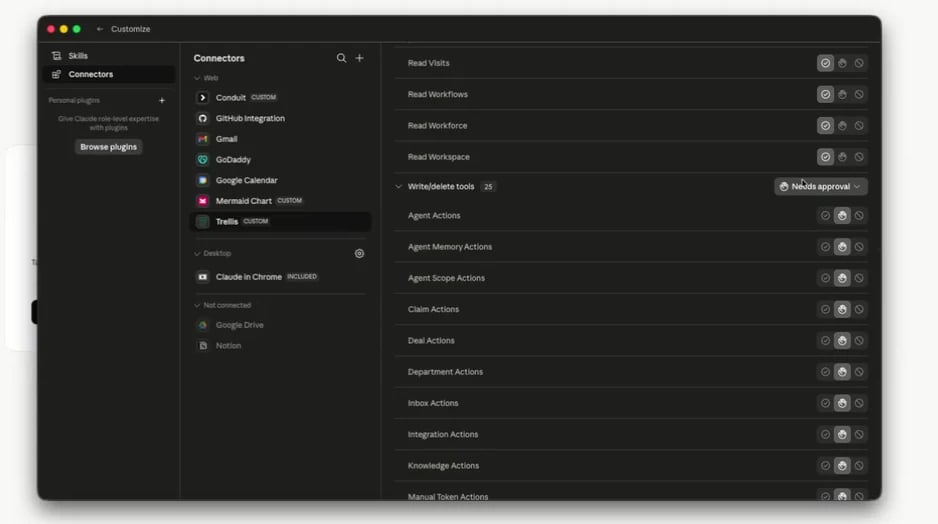
Claude Cowork
Open Settings > Developer in Trellis and choose the connection instructions for Claude Cowork. Keep these instructions available while you add the connector in Claude.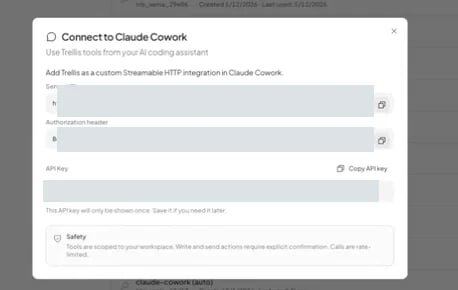
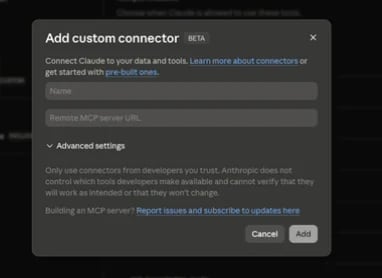
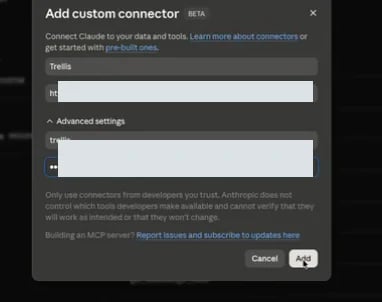
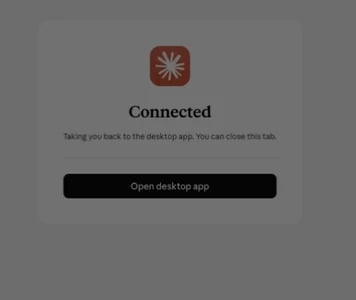
https://api.trellistech.com/v1/mcp-server as the server URL. Use the credential fields shown by the Trellis setup instructions and complete the connection prompt. Keep the API key private.
Cursor and Codex
Workspace admins can also connect from Settings > Developer in Trellis. The Developer / API section can create a workspace key and prepare setup instructions for Claude Code, Claude Desktop, Claude Cowork, Cursor, and Codex.Generic MCP clients
Prefer Streamable HTTP:TRELLIS_API_KEY in the client environment before starting the stdio bridge.
Workspace selection
Trellis API keys are workspace-scoped. Every MCP tool includes an optionalworkspace_id argument. Leave it empty to use the workspace this API key was issued for. If you provide it, it must match the key’s scope; cross-workspace calls are rejected.
trellis-haven, trellis-renjoy). Revoking a key in one workspace stops access there without affecting the others.
Tool catalog
Use your MCP client’s tool list or run:Read filters and financial data
- The input schema published by each tool is authoritative. Unsupported filter names are rejected instead of being accepted and silently ignored.
- Reservation reads expose payment status and provider/source freshness only through the financial preset and only when the API-key user has revenue access. Those fields report PMS evidence; they do not authorize charging a guest, sending a payment link, issuing a refund, or blocking access.
- When a tool does not publish a filter or field needed by your integration, treat it as unavailable and contact support rather than filtering a broader response locally and assuming the server enforced the scope.
Reading paginated and partial results
Checkanswer_status, data_partial, and pagination metadata before treating a
result as exhaustive. A response can contain every row in its page while some
large fields are shortened or omitted; content_truncation identifies those
changes. Request the named record and the fields you need before relying on
missing detail.
Workflow definition reads (workflows_v2_definition_get and
workflows_v2_candidate_get) never shorten step content. When a definition is
too large for one response, step_outline in the returned version lists every
step with its routing, steps holds the complete steps that fit, and
suggested_next_call names the remaining step ids in stepIds. Follow it
until data_partial is false before editing, or pass stepIds to read
specific steps.
These reads also leave out each schema that saving would derive identically:
an input_schema built from the step’s inputs, and an ACTION
output_schema equal to its action contract. The version’s
schema_projection.omitted lists them by step, with the action as
{"$ref": "action:<selector>"}. Send those steps back without the omitted
schemas. Pass includeSchemas: true to get every stored schema.
TrellisQL may return fewer rows than the requested limit to preserve whole
records. Its continuation starts after the last returned row. Keep the same
filters and follow pagination.next_cursor until there are no more pages.
Treat cursors as opaque values and pass them back unchanged.
read_sessions with action="history" returns full stored message text and
pagination metadata. Use message_limit to control the page size and follow
the returned cursor to read the rest of the session.
Reading complete conversation messages
read_inbox and the messages view in trellisql_query return stored message
text, including links. Each message reports content_source,
content_complete, and content_original_length. A preview or stripped reply
cannot establish completeness: its original length is null.
When a response reaches its size limit, it returns fewer whole messages first.
Follow suggested_next_call for inbox history or pagination.next_cursor for
TrellisQL to retrieve the next page. Conversation pagination and message text
completeness are separate: check both before summarizing a full conversation.
For a batch of conversations, follow each unfinished conversation’s
message_recovery independently.
A single message that exceeds the response limit includes content_recovery
with the exact next read_inbox call. Its filters contain the conversation id,
message_id, content_offset, content_limit, and content_version. Follow
that call until content_has_more is false, appending each returned content
block in order. Offsets count Unicode characters. Keep the version unchanged;
if the message changes during retrieval, restart from offset zero without the
old version. These reads use the same workspace and inbox permissions.
Resources
The hosted endpoint also exposes read-only MCP resources:
Resources are scoped to the workspace API key. Use them when a client needs instructions, skills, or agent knowledge as context without calling a Trellis operation tool.
Safety model
- Read tools remain limited to the workspace and permissions available to the key.
- Write tools keep the same permission and confirmation behavior as Trellis.
- Messaging tools must show the payload and wait for explicit confirmation before sending.
- Clients receive a clear error when a call cannot be completed.
- The hosted endpoint applies basic per-key rate limiting.
Example: Slack triage bot
- Add the Trellis MCP server to the AI client that powers your Slack bot.
- Store
TRELLIS_API_KEYin the bot runtime environment. - In your bot instructions, tell it to use Trellis tools for task lookup, task summaries, and task updates.
- Require explicit confirmation before calling any tool that creates tasks, updates tasks, or sends messages.
- If the bot serves several workspaces, configure a separate key and connection for each one. Route each request to the matching connection;
workspace_idalone cannot change access.